
How to Spot a Credit Card Skimmer Before It Steals Your Money
Jun 29, 2026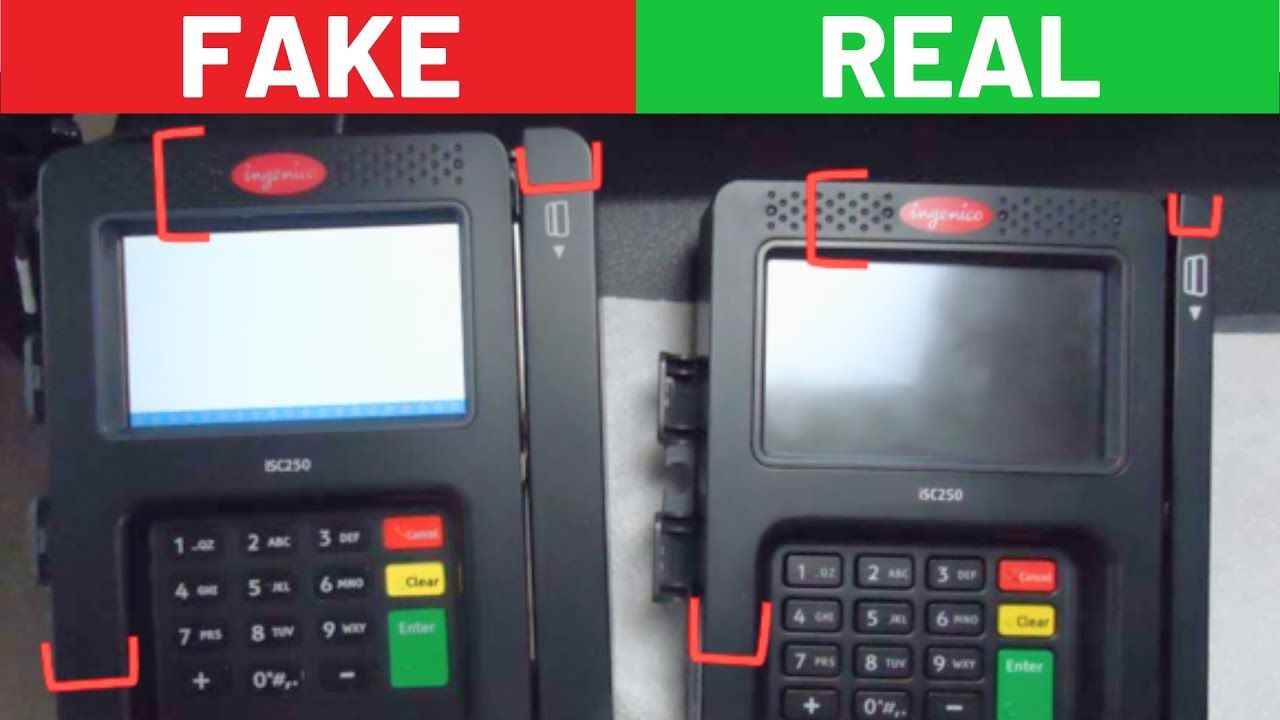
Credit card skimmers are getting harder to spot.
That is the scary part.
A skimmer can be placed over a real card reader and look almost identical to the machine you use every day. You swipe or insert your card like normal, the transaction goes through, and you walk away thinking everything is fine.
Meanwhile, a scammer may have just stolen your card information.
That is why you need to know what to look for before you use an ATM, gas pump, retail terminal, or any payment machine that feels even a little off.
The good news is that you do not need to be a fraud expert to protect yourself. There are simple warning signs that can help you spot a skimmer in seconds.
Disclosure: This article may contain affiliate links, which means I may earn compensation if you click or apply through certain links.
Quick Answer
A credit card skimmer is an illegal device placed on or inside a payment terminal to steal card data, usually from the magnetic stripe. The easiest way to spot one is to check for loose parts, mismatched colors, bulky attachments, odd alignment, sticky residue, keypad issues, or trouble inserting your card. The safest way to avoid skimmers is to use tap-to-pay, mobile wallet payments, bank ATMs, transaction alerts, and regular account monitoring.
How Credit Card Skimmers Work
A normal card reader is basically a messenger.
When you swipe, insert, or tap your card, the machine reads your card details and sends them to the payment network and your bank. The bank checks whether the transaction should be approved. If everything looks good, the payment goes through.
A skimmer hijacks that process.
A credit card skimmer is an illegal card reader that criminals hide on or inside a real payment machine. When you swipe your card, the skimmer secretly captures the card information stored on the magnetic stripe.
Think of it like someone copying your house key without you knowing.
You keep using your key like normal, but now someone else has access too.
That is what makes skimming so dangerous. You may not notice anything wrong until fraudulent charges show up later.
Credit Card Skimmer Hotspots
Skimmers can show up almost anywhere cards are accepted, but some locations are bigger targets than others.
Here are the main places where you should be extra careful.
ATMs
ATMs are one of the biggest skimmer hotspots.
This includes bank ATMs and standalone machines in convenience stores, malls, airports, hotels, and other public spaces.
Standalone ATMs are especially risky because they may not be monitored as closely as machines inside bank branches.
Before using an ATM, check the card slot, keypad, and surrounding faceplate. If anything feels loose, bulky, crooked, or out of place, use another machine.
Gas Stations
Gas pumps are another major target.
The payment terminals sit outside, often away from employees, cameras, and foot traffic. Pumps on the outer edges of the property can be even more vulnerable because scammers have more privacy.
If you can, use tap-to-pay at the pump or pay inside.
Also check for broken security stickers, loose card readers, odd attachments, or anything that looks different from the other pumps.
Retail Stores
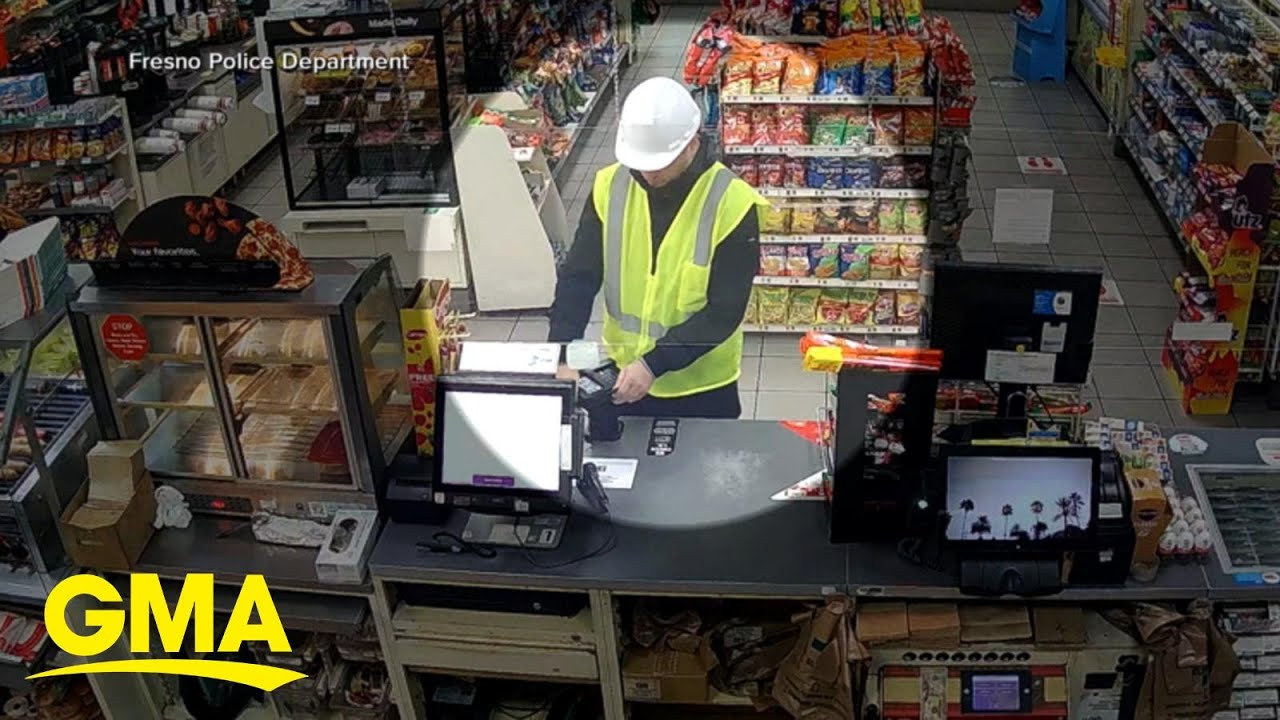
Skimmers can also be placed on retail payment terminals.
Smaller stores, less busy locations, and terminals with limited employee supervision may be easier targets.
Before inserting or swiping your card, give the terminal a quick look. A few seconds of checking can save you a huge headache later.
Restaurants and Bars
Restaurants and bars are risky for a different reason.
Your card may leave your sight.
Anytime your card disappears behind a counter, into a back room, or away from your table, there is more opportunity for card information to be copied.
This is why mobile wallet payments, tap-to-pay, and handheld payment terminals are better when available.
Public Transport Ticket Machines
Ticket machines at train stations, bus stations, airports, and transit hubs can also be targets.
These machines get heavy use and may not always be watched closely. A scammer can install a skimmer quickly, then collect card information from dozens or hundreds of people before anyone notices.
How Fast Can Skimmers Be Installed?
This is the part that should make you pay attention.
A skimmer can be installed extremely fast.
In some cases, criminals can walk up to a payment terminal, snap a device over the reader, and walk away in seconds.
They may use distraction tactics too. One person distracts an employee while another tampers with a machine. At a gas station, that could mean one scammer talking to the attendant while another installs a device on a pump farther away.
Late-night or low-traffic locations can be even worse.
At 3 AM, a convenience store ATM or outdoor gas pump may not have anyone watching closely. That gives a scammer just enough time to install a device and disappear.
There can also be insider involvement. An employee with access to a payment terminal could install or assist with skimming equipment after hours.
That is why you cannot rely only on the business to protect you.
You need your own quick inspection habit.
10 Ways to Spot a Credit Card Skimmer
A lot of skimmers look almost identical to the real thing.
But they usually leave clues.
Before you swipe or insert your card, look for these warning signs.
1. The Keypad Does Not Light Up
On many real terminals, the keypad lights up when you enter your PIN.
If the keypad is dark, dim, or not responding normally, that can be a warning sign.
It does not automatically mean there is a skimmer, but it is enough to make you slow down and inspect the machine.
2. The Keys Feel Too Flat
Real keypad buttons usually have some height to them. They should feel slightly raised when you press them.
If the keys feel unusually flat, stiff, or flush with the surrounding surface, there could be an overlay sitting on top of the real keypad.
That overlay may be designed to capture your PIN.
3. The Stylus Holder Looks Wrong or Missing
Some payment terminals have a stylus holder for signatures or commands.
If the holder is missing, blocked, crooked, or looks different than normal, the terminal may have been tampered with.
This is one of those small details most people ignore, but it can matter.
4. The Terminal Looks Too Thick
A skimmer adds extra material to the machine.
That means the card reader, keypad, or faceplate may look thicker or bulkier than normal.
If one machine looks fatter than the others nearby, do not use it.
Compare it to another pump, ATM, or checkout terminal if possible.
5. The Card Reader Wobbles
A real card reader should feel secure.
If the card slot moves, wiggles, shifts, or feels like it could pop off, that is a major red flag.
Use your fingers and gently tug on the card reader before inserting your card. Do not yank it like you are trying to break it, but give it a light check.
If it moves, walk away.
6. The Colors Do Not Match
Look at the color of the card reader, keypad, plastic trim, and faceplate.
If one piece looks slightly different from the rest of the machine, it could be an added skimmer.
Mismatched colors are one of the easiest clues to miss because people are usually in a rush. But if one part looks newer, darker, lighter, or slightly off, pay attention.
7. The Reader Looks Misaligned
Skimmers are often placed over the real card reader.
Because of that, the edges may not line up perfectly.
Look for uneven gaps, crooked plastic, shifted panels, or anything that seems slightly off-center.
If it looks like something was stuck on top of the machine, do not use it.
8. There Are Strange Attachments
A real payment terminal should look clean and seamless.
Be careful if you see extra attachments, odd plastic pieces, strange covers, hidden cameras, or anything that looks like it does not belong.
This includes anything around:
-
The card slot
-
The keypad
-
The screen
-
The sides of the terminal
-
The ATM faceplate
If it looks weird, trust your gut.
9. You See Scratches or Sticky Residue
Installing or removing a skimmer can leave marks.
Look for scratches, tape residue, glue marks, cracked plastic, or areas that look like something was recently attached.
A little wear and tear is normal on older machines. But fresh adhesive marks near the card reader or keypad are a problem.
10. Your Card Is Hard to Insert or Remove
Your card should slide in and out smoothly.
If it feels tight, blocked, sticky, or harder than usual to insert or remove, stop.
A skimmer placed over the real reader can narrow the card slot, making it harder for the card to move normally.
Do not force it.
Use a different machine.
How to Avoid Credit Card Skimmers
Spotting skimmers is important.
Avoiding them is even better.
Here are the best ways to lower your risk.
Use Tap-to-Pay or Mobile Wallets
Tap-to-pay is one of the best ways to avoid skimmers.
Apple Pay, Google Pay, and contactless cards use tokenized payment data. That means the transaction uses a one-time code instead of exposing the same card information over and over again.
So even if a scammer intercepts the transaction data, it is much harder for them to reuse it.
This is why I prefer tap-to-pay whenever it is available.
You do not have to insert the card. You do not have to swipe the magnetic stripe. You do not have to hand your card to anyone.
That alone cuts down a lot of risk.
Use Bank ATMs Instead of Random ATMs
Non-bank ATMs can be sketchy.
You often see them inside convenience stores, hotels, bars, gas stations, and tourist areas. Some are not monitored well. Some may not have the same security standards as bank-owned ATMs.
Whenever possible, use ATMs inside bank branches.
Those machines are more likely to be watched, inspected, and protected.
Choose Machines in Open, Visible Areas
Scammers like privacy.
They do not want to install a skimmer in front of a crowd.
That is why you should choose payment terminals and ATMs that are in bright, visible, high-traffic areas.
A gas pump right near the cashier window is usually safer than the pump way out on the edge of the property.
An ATM inside a bank is usually safer than a random machine in a dark corner.
Use Cash in Sketchy Places
Sometimes the best move is simple: use cash.
If a machine looks off, the location feels sketchy, or you do not trust the setup, cash eliminates the risk of card data theft.
They cannot steal your card number if you do not use your card.
Set Up Transaction Alerts
Transaction alerts are one of the easiest ways to catch fraud fast.
Most banks and credit card companies let you turn on alerts by text, email, or app notification.
You can usually set alerts for:
-
Every transaction
-
Transactions over a certain dollar amount
-
Online purchases
-
International purchases
-
Card-not-present purchases
-
ATM withdrawals
If someone uses your card, you want to know immediately.
That gives you a chance to lock the card, contact the bank, and dispute the charge before the damage gets worse.
Review Your Accounts Regularly
Do not wait until the statement closes.
Check your bank and credit card accounts often.
Fraud is much easier to fix when you catch it early. If you wait weeks or months, it can become a bigger mess.
This is especially important if you have multiple credit cards, debit cards, business cards, or high available credit limits.
Helpful resource: If fraud or identity theft has damaged your credit and you are rebuilding before applying for new cards, my Free Credit Card & Loan Pre-Approval Master List can help you compare options before taking unnecessary hard pulls.
Credit Cards Are Safer Than Debit Cards
When possible, I prefer using credit cards instead of debit cards.
Why?
Because a stolen debit card can put your actual cash at risk.
If someone drains your checking account, you may have to fight to get your money back while bills, rent, payroll, or expenses are still due.
With a credit card, fraudulent charges usually hit the bank’s money first, not your checking account balance.
That does not mean credit card fraud is fun. It is still a headache.
But from a damage-control standpoint, credit cards can be safer than debit cards for everyday purchases.
What to Do If You Think You Used a Skimmer
If you think you used a compromised payment terminal, move fast.
Here is what I would do:
-
Lock the card immediately in your bank app.
-
Review recent transactions.
-
Report suspicious charges to your bank.
-
Request a replacement card.
-
Change your online banking password.
-
Turn on transaction alerts.
-
Check your credit reports if identity theft is possible.
-
Consider a fraud alert or credit freeze if your personal information was exposed.
The sooner you act, the easier it usually is to contain the damage.
Frequently Asked Questions
What is a credit card skimmer?
A credit card skimmer is an illegal device that steals card information when you swipe or insert your card. It is usually hidden on or inside a real payment terminal, ATM, or gas pump.
How can you tell if a card reader has a skimmer?
Look for loose parts, bulky attachments, mismatched colors, crooked card slots, sticky residue, keypad overlays, or difficulty inserting your card. If the machine feels wrong, do not use it.
Are gas pumps more likely to have skimmers?
Gas pumps are a common target because many payment terminals are outside and not always watched closely. Pumps farther away from the cashier or building may be riskier.
Is tap-to-pay safer than swiping?
Yes, tap-to-pay is generally safer than swiping because it uses tokenized payment data instead of repeatedly exposing your magnetic stripe information. Mobile wallets like Apple Pay and Google Pay can reduce skimming risk.
Should I use a debit card at an ATM or gas pump?
Be careful. Debit cards connect directly to your bank account, so fraud can put your cash at risk. If you must use a debit card, use trusted bank ATMs, cover your PIN, and monitor your account closely.
What should I do if my card was skimmed?
Lock the card, contact your bank, dispute any fraudulent transactions, request a replacement card, and monitor your accounts. If personal information was stolen, consider a fraud alert or credit freeze.
Conclusion
Credit card skimmers are sneaky, fast, and getting harder to spot.
But they are not impossible to avoid.
Before you use a payment terminal, take a few seconds to inspect it. Check if the card reader is loose. Look for mismatched colors. Watch for bulky attachments. Make sure the keypad feels normal. And if your card does not slide in smoothly, do not force it.
The safest move is to use tap-to-pay, mobile wallets, bank ATMs, transaction alerts, and regular account monitoring.
A few seconds of caution can save you weeks of stress.
Do not swipe blindly.